One of the things that confuse a new blogger more than anything is RSS (Really Simple Syndication) feeds. In this article we will become friendly with RSS feeds. This article aims to answer following questions:
1.) What is RSS? What are feeds?
2.) What is its use?
3.) Why should I use it?
4.) Who should use it?
5.) When should I use it?
6.) How to use it?
7.) What are other benefits of RSS?
After answering these common queries, we will move to implementation details:
1. Default RSS feeds provided by popular Blogging Service Providers (Blogger and Wordpress)
2. Different RSS feeds URLs for posts and comments and subscriptions for each.
3. Popular RSS reader and RSS feed service Provider.
4. FeedBurner Customization
5. Adsense and Amazon Integration for FeedBurner Feeds.
6. Common Issue in redirections of Feeds.
7. Migration from FeedBurner to Google acquired FeedBurner – Changes and Effects
8. Feeds to Twitter (Auto-tweets!)
9. Different ways to showcase your Feeds on:
a. Facebook
b. Twitter
c. LinkedIn
d. Orkut
e. Google Reader’s Share Feed Service
f. Feeds on Google SMS Channel for Free SMS alerts
10. New Developments in Feeds Arena (HubbShubbPubb Protocol)
And at last: Some Suggestions for better results
So let’s get on with the show!
I will start with a small story for analogy.
Once upon a time there was this fantasy world called Internet where there was true democracy and people were known by their handles and blogs. Their Blogs were their homes and they did everything to make it beautiful, useful and popular. However, there was one problem their blogs were like homes of people who lived on planet Earth – They were immobile. Visitors had to visit their homes, remembering their complete address. Even a single alphabet change in address will misguide to different and wrong home. If they made any changes to their homes which they do almost on a daily basis as people who live in this world don’t have any other work, they had no way of notifying people about new developments in their homes. They put a lot of effort in their homes and no one visited their homes as they didn’t know what different there since their last visit. Even some of their closest pals were left alone.
Then dawned the era of RSS, Atoms and Feeds. These three brothers came with an innovative service they named after themselves. They travelled far and wide to every home giving them news and updates about the new developments in the homes they were interested in. They were like the new age information channel and carried a copy of the homes with themselves whom they delivered, on time, at the home or post box of the interested party. They changed the world and solved many of the much desired tribulations. They also delivered these updates in varied forms even audio updates.
CNN refers to this evolution as:
“- Do you remember the day you first surfed the Web, stretched out your arms over the vastness of cyberspace, teleported from site to site with an almost exhilarating power? Or alternately, sat waiting for "fat" pages to load?
Well, hang on to your hats boys and girls, because your experience of the World Wide Web is about to change, possibly for the first time since Mosaic, one of the first graphical browsers, was unleashed in 1993 from Champaign-Urbana, Illinois.
If I'm saying the Web is changing and that you'd better get on board or miss out, I'd better be prepared to back it up. I believe I can.”
Now let’s get to the topics.
1.) What is RSS? What are feeds?
Feeds are a way for websites large and small to distribute their content well beyond just visitors using browsers. Feeds permit subscription to regular updates, delivered automatically via a web portal, news reader, or in some cases good old email. Feeds also make it possible for site content to be packaged into "widgets," "gadgets," mobile devices, and other bite-sized technologies that make it possible to display blogs, podcasts, and major news/sports/weather/whatever headlines just about anywhere.
You may recognize the universal feed icon or these "chicklets" from your favorite websites, blogs, and podcasts. These icons represent content in any format - text, audio or video - to which you can subscribe and read/watch/listen using a feed reader. What's that?
2.) What is its use? and
3.) Why should I use it?
Technology evolution in online publishing has made it really easy to not only publish regular updates to web-based content, but also keep track of a large number of your favorite websites or blogs, without having to remember to check each site manually or clutter your email inbox. You can now streamline your online experience by subscribing to specific content feeds and aggregating this information in one place to be read when you're ready.
· Consumer Bottom Line: Subscribing to feeds makes it possible to review a large amount of online content in a very short time.
· Publisher Bottom Line: Feeds permit instant distribution of content and the ability to make it "subscribable."
· Advertiser Bottom Line: Advertising in feeds overcomes many of the shortcomings that traditional marketing channels encounter including spam filters, delayed distribution, search engine rankings, and general inbox noise.
4.) Who should use it?
Most of the biggest names on the web offer content feeds including USATODAY.com, BBC News Headlines, ABCNews, CNET, Yahoo!,Amazon.com (including a podcast!), and many more. Google publishes feeds as part of many of our services; for example, you can get a feed of new items for any search you make in Google News. In addition, hundreds of thousands of bloggers, podcasters, and video bloggers publish feeds to keep themselves better connected to their readers, listeners, admirers, and critics. Apple, through its iTunes Music Store, offers tens of thousands of audio and video podcasts for download, each of which is powered by a feed.
If you have a website, blog, audio/video content, or even photos, you can offer a feed of your content as an option. If you are using a popular blogging platform or publishing tool like TypePad, Wordpress, or Blogger, you likely publish a feed automatically. Even other non-blogging sites like social photo-sharing service Flickr offer feeds of content you produce that others can retrieve. There are also tools on the market that can help transform traditional web content into the right format for distribution.
FeedBurner's services allow publishers who already have a feed to improve their understanding of and relationship with their audience. Once you have a working feed, run it through FeedBurner and realize a whole new set of benefits.
· Learn more about FeedBurner's services for blogs, podcasts and commercial publications.
When should I use it?
As you might have guessed by now that since feeds take your content to the world, its better to start using them since the inception of your Blog. However, if you already have a blog and you haven’t used feeds, it’s not yet too late. Your Blogging Service Provided will already be providing Feeds and you just need to find out the feed URL. Then you can use FeedBurner to burn your feed and use the various options within FeedBurner to publicize it. In any case, it’s always advisable to start using feeds right away.
5.) How to use it?
If you want to browse and subscribe to feeds, you have many choices. Today, there are more than 2,000 different feed reading applications, also known as "news aggregators" (for text, mostly) or "podcatchers" (for podcasts). There are even readers that work exclusively on mobile devices.
Some require a small purchase price but are tops for ease-of-use and ship with dozens of feeds pre-loaded so you can explore the feed "universe" right away. Free readers are available as well; a search for "Feed reader" or "Feed aggregator" at popular search sites will yield many results. A handful of popular feed readers are listed at the bottom of this page.
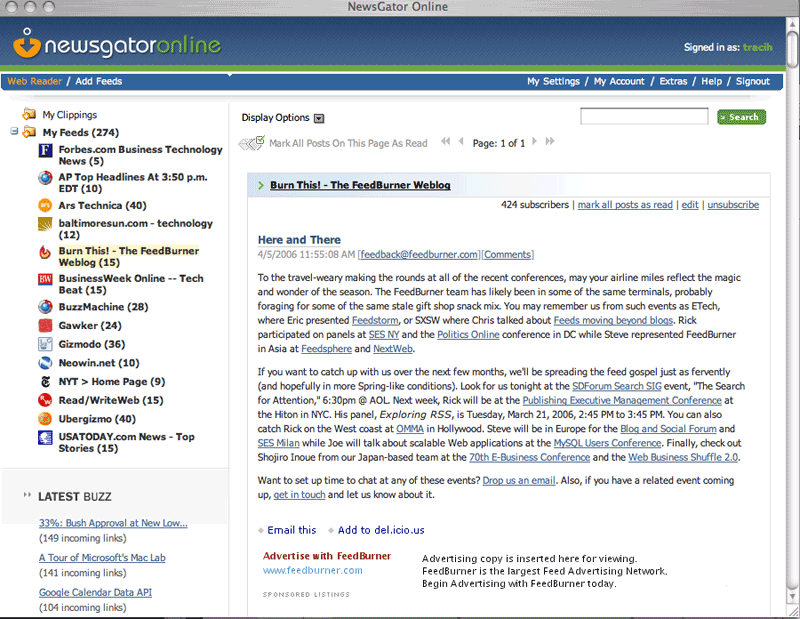
A typical interface for a feed reader will display your feeds and the number of new (unread) entries within each of those feeds. You can also organize your feeds into categories and even clip and save your favorite entries (with certain applications).
If you prefer, you can use an online, web-based service to track and manage feeds. Online services give you the advantage of being able to access your feed updates anywhere you can find a web browser. Also, upgrades and new features are added automatically.
· Show me what a typical feed reader looks like.
7.) What are other benefits of RSS?
Along with these benefits, Feeds also opened a new market for advertiser. The ads embedded within your Feeds make your feeds, your new Web Real Estate. Advertising in feeds overcomes many of the shortcomings that traditional marketing channels encounter including spam filters, delayed distribution, search engine rankings, and general inbox noise. Google recently acquired FeedBurner and opened new vistas for advertiser and publishers.
Feeds - F.A.Q. and D.I.Y.
Here are some of the Frequently Asked Questions and Do It Yourself Tips and tricks for branding and publicizing your Feed and Web Content along with Social Networking add-ons:
1. Default RSS feeds provided by popular Blogging Service Providers (Blogger and Wordpress)
http://yourBlogName.blogspot.com/feeds/comments/default (for Comments)
http://yourBlogName.blogspot.com/feeds/posts/default (for Posts)
e.g.:
http://bloggingconfessions.blogspot.com/feeds/comments/default
http://bloggingconfessions.blogspot.com/feeds/posts/default
2. Different RSS feeds URLs for posts and comments and subscriptions for each.
http://yourBlogName.blogspot.com/feeds/comments/default (for Comments)
http://yourBlogName.blogspot.com/feeds/posts/default (for Posts)
3. Popular RSS reader and RSS feed service Provider.
Applications
- · NewsGator - FeedDemon 2.0
(Windows, more info) - · NewsGator - Inbox for Microsoft Outlook
(Windows) - · NewsGator - NetNewsWire
(OS X) - · Firefox
(via "Live Bookmarks" feature) - · Safari
(feed support in the Apple OS X native browser) - · Pulp Fiction
(OS X)
Online Services
- · Google Reader
- · NewsGator (Online)
- · My Yahoo!
- · Bloglines
- · Pageflakes
- · Netvibes
Podcast Readers
4. FeedBurner Customization
5. Adsense and Amazon Integration for FeedBurner Feeds.
6. Common Issue in redirections of Feeds.
7. Migration from FeedBurner to Google acquired FeedBurner – Changes and Effects
8. Feeds to Twitter (Auto-tweets!)
9. Different ways to showcase your Feeds on:
e. Google Reader’s Share Feed Service
f. Feeds on Google SMS Channel for Free SMS alerts
10. New Developments in Feeds Arena (HubbShubbPubb Protocol)
More Resources
- Mark Pilgrim at XML.com
- Wired Magazine: Aggregators Attack Info Overload
- MediaThink: RSS: The Next Big Thing Online (an introduction to RSS implications for business)
- BBC News
- Wikipedia
You can meet me here:
Related Posts:


 Posts
Posts